work / full-stack / wattsup-office-monitor
WattsUp Office Energy Monitor
A real-time office lights-and-fans monitor with a live 3D dashboard, shared Node backend, virtual office clock, alert engine, and Discord bot control surface.
- devices
- 15
- 3 rooms, 6 fans, 9 lights
- realtime
- Socket.IO
- dashboard sync without refresh
- bot surface
- 7 commands
- status, rooms, usage, alerts, controls
- alert rules
- 2
- after-hours and long-running rooms
system architecture / interactive
The problem
Small offices waste power in boring ways: fans and lights are left on, nobody knows which room is responsible, and after-hours waste only becomes visible when the bill arrives. WattsUp turns that invisible state into two live views: a 3D office dashboard for the browser and a Discord bot for quick remote checks.
The project uses simulated device data, not people data. The fixed office model has three rooms, each with two fans and three lights. Fans draw 60 W, lights draw 15 W, and the whole office tops out at 495 W.
One source of truth
The core rule is that the dashboard and bot never invent state. A Node and Express backend owns the in-memory device store, room summaries, usage totals, simulation state, virtual clock, and alerts. The React dashboard receives live updates over Socket.IO, while the Discord bot reads the same state through REST.
Manual control follows the same rule. Clicking a fan or light in the 3D scene, flipping a rocker switch in a room card, or turning off a room sends a backend control request first. The UI only updates after the backend rebroadcasts the new snapshot, so every client agrees.
A dashboard that shows the office
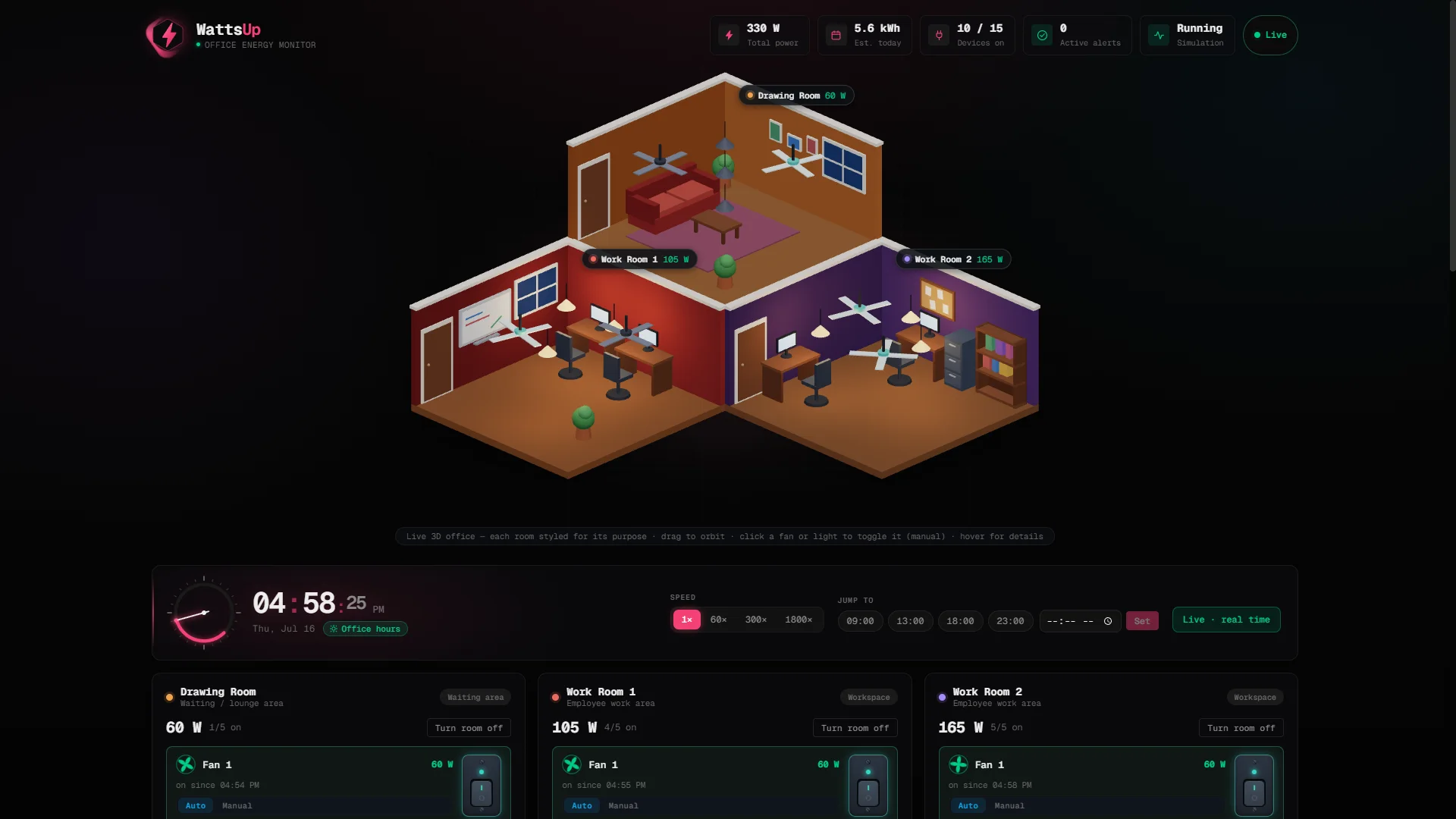
The dashboard renders a procedural low-poly office in Three.js, with different room identities for the lounge and two work rooms. Ceiling fans spin when on, lamps glow with real point lights, and hovering a device shows room, status, watts, mode, and last-changed data.
Every device also has a detailed card with Auto and Manual modes. The simulator nudges only Auto devices, so manual decisions are respected until the user resets devices back to Auto.
Time controls and alert rules
WattsUp has one virtual office clock. Timestamps, alert age, and estimated kWh all derive from that clock, so the dashboard and bot stay consistent even when the demo jumps to 6 PM or runs at 1800x speed.
The alert engine covers two concrete rules: devices on outside 9 AM-5 PM and rooms with all five devices on for more than two hours. Alerts use stable IDs so the Discord bot can post new warnings without spamming repeats.
Discord as the second interface
The bot supports status, room, usage, alerts, simulation, turnoff, and help commands. It can answer "what is on right now?", break down watts by room, turn everything off, pause the simulator, and post proactive alert embeds to a configured channel.
Because it reads the same backend as the dashboard, Discord is not a screenshot of the app; it is a second operational surface over the same system.
Hardware concept
The hardware schematic models one representative room with an ESP32, five switch inputs, five LED indicators, and an optional current-sensor path. It is intentionally a concept layer for the simulated project, but it makes the control story realistic: a real deployment would repeat the same input/indicator block per room and let the backend remain the shared state authority.
stack
the evidence